Notes on Building a Brain
Where I document building Jaswiki, my personal AI-powered knowledge system
There is a specific kind of disappointment that comes from doing something genuinely useful and realising, a few months later, that you have nothing to show for it.
I had spent a good amount of time last year automating my meeting notes. I had a pipeline: record, transcribe, feed to Gemini, get a clean document. It worked really well. I was proud of it. And then I tried to find a doc.
I usually press Cmd+T on Dia and if a document is recent enough it shows up. This time it didn’t. I then went to docs.google.com and looked at about sixty well-formatted documents sitting in there, between Gemini notes and random things people had shared with me and I had opened. I realised that I had absolutely no idea what was in these docs. Which one was the doc I wanted? More importantly--did it even have the information I remember writing down somewhere?
I had automated the creation of content. I had not automated its synthesis.
Karpathy's LLM Wiki
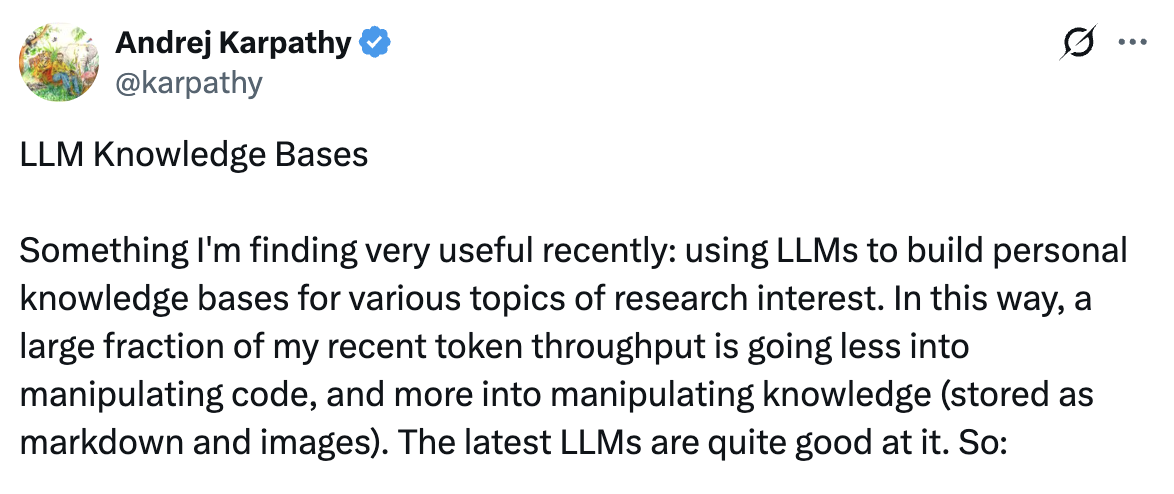
Two weeks ago I came across Andrej Karpathy's idea, the LLM wiki. The premise is fairly simple: instead of writing notes for humans to read, you write notes optimised for an LLM to read and reason over. More importantly, you let the agent build and maintain the knowledge base for you.
The wiki is a persistent, compounding artifact.
Spoiler alert: it’s actually crazy.
The concept clicked immediately for me. The problem with my note graveyard was not that the notes were bad. It was that there was no connective tissue. No graph. No way for anything to reason across the whole thing.
So I decided to build one.
It sounded even more interesting because we’ve been solving something similar for contracts with Kratos, SpotDraft’s document intelligence layer. I wanted to see if I could build something similar for myself.
Below, you’ll read about how I went from that initial idea to a working system that ingests documents, builds a structured knowledge graph, and lets me query it. It covers the architecture, the mistakes, the optimization, and some specific product and engineering decisions.
It does not cover everything. I am still building this. There will be more posts.
Skip to the takeaways at the bottom if you'd like.
Also, the agent harness code I wrote is available in this GitHub repo. Feel free to take a look and contribute!
Starting with a PRD
I opened a Claude conversation and started braindumping some context (I use Wispr Flow).
I spoke about my workflow: the types of meetings I have, the kinds of customers I talk to, the problems I am usually trying to solve, the categories of information I find myself needing to retrieve. I wrote about what frustrated me about my current system. I described what "done" might look like.
That. along with Karpathy's LLM Wiki gist, allowed Claude to write a PRD for the system I was describing.
The doc that came out was good. More importantly, it was structured. It had a problem statement, a set of agent modes, a data model, a folder structure, constraints. It was something you could hand to an engineer and they would know what to build.
I handed it to Cursor and told it to produce a tasks.md file. Then I said “Ship it”.
This is a workflow we’ve been using to ship products for a while now. You give an AI some thoughts and opinions and decisions, and ask it to create a structure. You use another one to execute. The separation matters because the planning context and the execution context serve very different purposes. If you mix them, the execution agent gets confused.
In 2026, my PRD is not just a document for my team. For a while now, I’ve been making documents for agents.
Deliberately Simple
I want to describe the system so you understand what I am actually talking about for the rest of this post.
Jaswiki is a command-line tool. There is no UI. It runs on my Mac. It uses Claude's API (4.5 Haiku, which I will come back to) and has access to a set of native tools: read_file, write_file, patch_file, grep, read_line, the lot.
The knowledge base itself is a folder of .md files. That is it. No vector database, no embeddings, no Pinecone, no Turbopuffer, no anything that requires a separate server. Just folders and files that I can open in any text editor.
The agent has five modes:
- Ingest: Takes a document (a transcript, a note, a raw dump of text) and extracts structured knowledge from it, writing that knowledge into the graph.
- Query: Takes a question in plain English and traverses the graph to answer it.
- Refactor: Reorganises the folder structure and updates backlinks when the graph gets messy.
- Sync (placeholder): Will eventually pull from external sources like Slack and Google Drive.
- Reflect (placeholder): Will eventually traverse the graph to generate inferred knowledge.
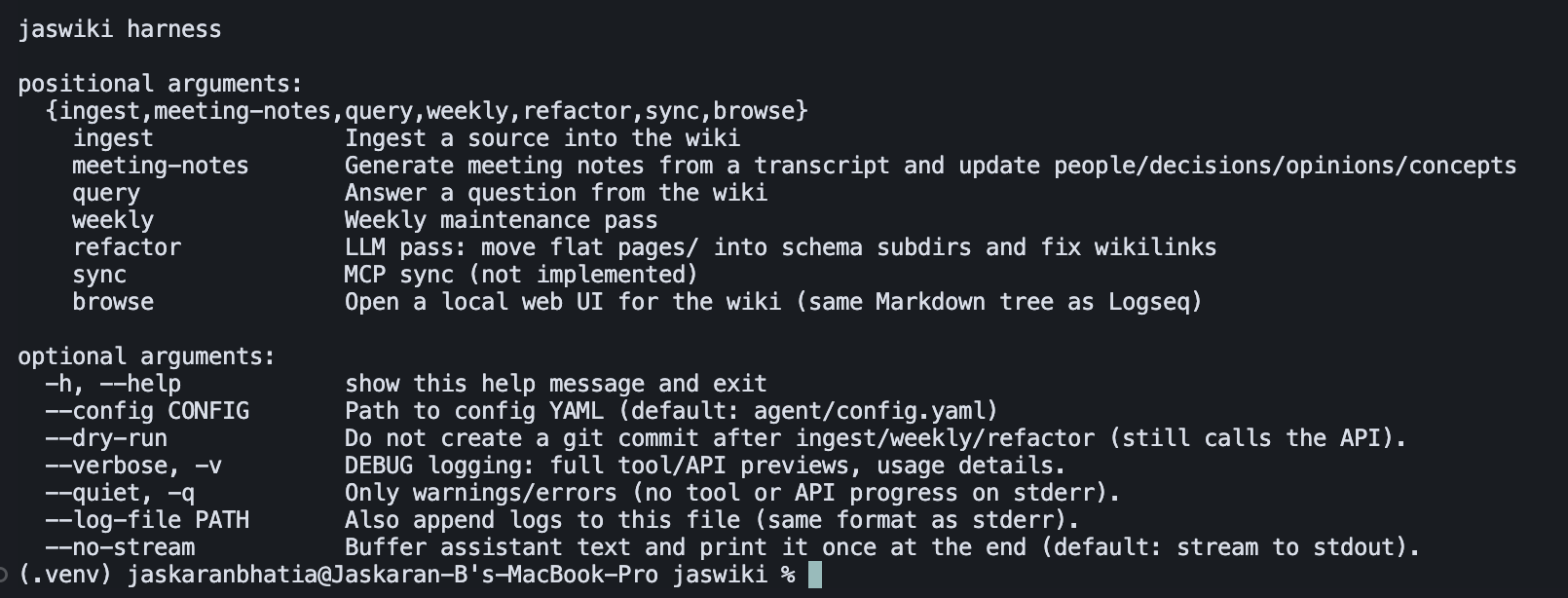
The tool-calling setup is worth explaining briefly. The agent does not have access to my entire file system; it has access to a set of Python functions that wrap specific bash operations. It can grep for a pattern, it can read lines 10 to 40 of a file, it can write to a file, it can commit to git. Each tool has a well-defined input and output. This is deliberate: constrained tools mean the agent cannot do something weird like recursively delete a directory because it misunderstood the task.
The Ontology Problem (Or: How a Brainstorming Call Changed My Data Model)
I started with four categories: Concepts, Customers, People, and Projects. Ingested my first ten documents and the system created a reasonable baseline. It worked.
Then I actually started using it.
The first issue appeared: I was on a Sidebar call and said something like, "I think we should build a file system before building a sandbox." That is not a concept. It is not really a project. It is a directional stance, loosely held, open to being disproved.
I ingested the transcript from that call and the agent filed it under Concepts. But when I queried the system later and asked about indexing strategy, it gave me back this opinion of mine as if it were settled fact. That is a problem.
I needed the system to know the difference.
So I added two new categories:
- Decisions: Something that was actually decided, by whom, in what context, and with what alternatives considered. Historical and fixed.
- Opinions: A stance I hold that is still subject to revision. Malleable. Something I believe but am willing to be argued out of.
This distinction sounds academic until you are trying to reconstruct why a product was built a certain way six months later. "We decided to do X because of Y" and "Jaskaran thought X was a good idea at the time" are completely different artifacts.
An opinion you held on a Tuesday afternoon is very different from a decision made in a product review with three engineers and a CTO in the room.
The ontology has continued evolving. The Refactor mode helps me continue revising the knowledge structure. I now have sub-directories within Concepts for things like "Jobs to be Done" and "Just-in-Time" patterns, because the flat structure became too noisy as the document count grew. But the core principle is: do not design the schema upfront. Put real data through the system, let the friction tell you where new categories are needed, and add them then.
Backlinks Over Vectors
I want to spend a moment on this because it is the part of the architecture that I find most interesting.
A lot of RAG systems work by converting your documents into embeddings and storing them in a vector DB. When you query, it finds documents with similar embeddings and uses those to answer the question. This is called semantic retrieval.
With Kratos, we've been challenging that and trying to rely on simpler stuff like grepping (regex search) and BM25 (keyword search). That's the pattern a lot of new coding agents have been adopting, and it's simple. grep is actually older than Linux itself, and it's proving to be one of the most effective ways of powering agentic searches. I decided to piggy-back on the experimentation we had already done at SpotDraft.
In Jaswiki, the knowledge is a graph. Every document in the graph contains explicit backlinks to other documents. When the Ingest agent creates a new knowledge artifact, it reads existing index files, figures out what concepts are relevant, and writes links like [[concepts/jtbd]] or [[decisions/indexing-pipeline-rebuild]] into the new document. The index files themselves link back down to every document that references them.
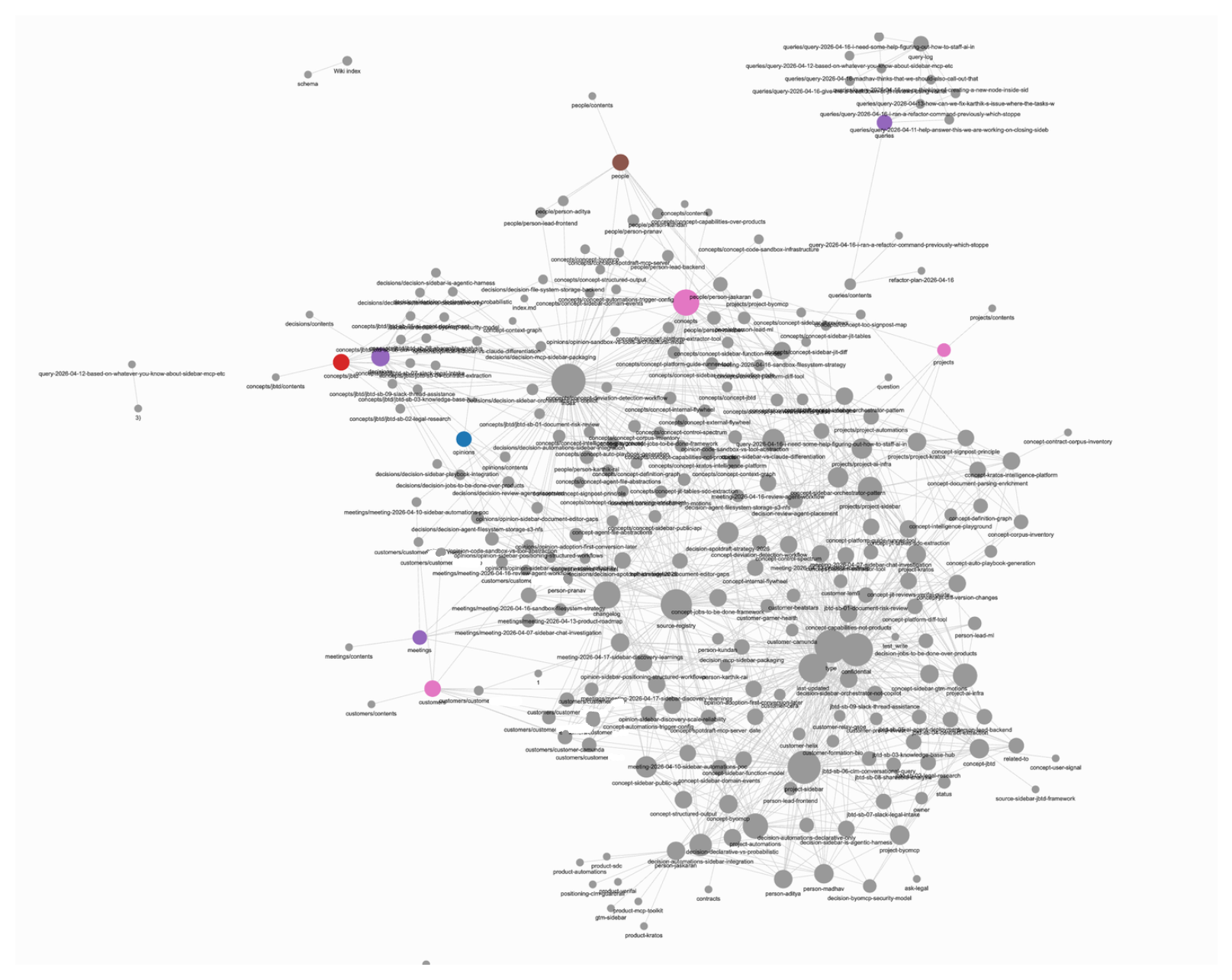
This is the Jaswiki knowledge represented as a graph, as of the date of writing.
When I run a query, the agent does not do a similarity search. It starts from a likely entry point (which it finds easily because of the hierarchical index.md and contents.md "Table of Contents" files located in every directory), reads that document, follows the backlinks to related documents, and assembles an answer from the traversal. This is Graph RAG, and the "graph" is just Markdown links.
Why does this work? A few reasons. First, the links are explicit, which means the structure reflects actual semantic relationships that were verified at ingest time, not probabilistic similarity. Second, it is transparent: I can open any file and see exactly why it is connected to something else. Third, it does not require a separate service, an embedding model, or any infrastructure beyond the file system.
The tradeoff is that the quality of the graph depends entirely on the quality of the backlink creation during ingest. If the Ingest agent makes a bad linking decision, the query will not find the relevant document*. With vector search, bad embeddings produce mediocre results but rarely produce no results. So this approach requires the Ingest step to be more careful. I manage this with a fairly detailed system prompt for the Ingest agent.
* This isn't entirely true. I've built the system so it can restart from the top and find a better entry point if it doesn't find the right information, but you get the idea.
Cost and Context: Why Haiku, and How I Made It Work
I want to be explicit about the cost side of this because it is one of the things people tend to gloss over.
Claude Haiku is the cheapest model in Anthropic's current lineup. It is meaningfully less capable than Sonnet or Opus on complex reasoning tasks. I chose it deliberately because the tasks Jaswiki runs on are high-frequency and relatively simple: read a document, extract structured information, write it to a file. You do not need a frontier model for that.
The problem with Haiku is context. It has a 200k token context window, which sounds like a lot, but if you are dumping entire documents into the prompt every time you run a query, you burn through it quickly and the costs add up fast.
In the first iteration, it was eating up too much context too quickly. I then wrote a cost optimization PRD in the same way as I did the first one, and laid out some thoughts from building Kratos. Cursor optimized some things, added a layer of context truncation, and I iterated a little to make sure things are working.
Once all was done, a typical ingest operation started costing me a few cents. A complex query still costs a bit more because it involves more tool calls. Running the weekly refactor on the whole graph costs a few cents. My total Jaswiki API spend for this month has been about $21. Compared to Neo, our in-house generalist agent (where we've spent over $2000--talk about that in a future post), this is nothing.
When It Broke: File Corruption and the Git Undo Button
With the cost optimization fixes in, I was ingesting a batch of documents and something went wrong. A couple of knowledge files ended up with truncated text and placeholder strings where there used to be actual information.
I discovered this when a query came back with something strange. I asked about a customer's context and the system returned a document that had <<truncated context: 419 chars>> and nothing else. Not ideal.
The reason this happened was that the agent started treating the truncated context in some cases as actual material, and started overwriting existing files.
I solved this in three ways.
The first was local Git. Since the beginning I had added a step to the agent's tool calls: after every file write, it commits the changes to a local git repository with a descriptive commit message. This means the entire history of the knowledge base is preserved as a series of commits, and rolling back to any previous state is a single git restore command.
Example Changelog from an ingest:
**2026-04-11 — meeting-notes: Sidebar × Automations POC (trigger payload + prompt design)**
- Created [[meeting-2026-04-10-sidebar-automations-poc]]: Detailed meeting notes from April 10 POC technical discussion
- **Key decision**: Context assembly in Django/Automations (not Sidebar); trigger payload = plain-text prompt with pre-assembled context
- Refined [[concept-sidebar-public-api]]: Updated with POC minimal API design (agent_id + prompt only; progressive enhancement later)
- Created [[concept-automations-trigger-config]]: New concept for per-trigger-type configuration system (which fields to include in prompt)
- Updated [[project-automations]]: Added POC strategy section, trigger-config references, action items, and timeline
- Updated _meta/entity-registry.md (added concept-automations-trigger-config entry)
- Updated _meta/source-registry.md (added meeting source entry)
- Updated _meta/context-graph.json (added new node and edges for trigger-config concept)
When I discovered these corrupted files, I asked Cursor to look through the git log, find the commit just before the corruption happened, and restore the affected files to that state. It took about two minutes.
The second fix was more structural: I gave the agent smaller, more targeted write operations. Instead of "read the entire index, merge the new document, rewrite the whole file," the agent now appends to index files and only rewrites sections it needs to touch. Smaller writes mean less context needed, which means less opportunity for Haiku to lose the thread.
The third, and crucially the most important one for a smaller model like Haiku, was graceful error messages. If the agent attempted to write to a file something that seemed like a placeholder, the tool call would throw an error and helpfully guide the agent.
An example error message:
error: content looks like a transcript omission placeholder, not real markdown. Do not paste transcript omission summaries (`[Prior write_file body for … omitted from transcript …]`), legacy tokens such as <<jaswiki:omit\n… [240 more chars truncated]'
In general, from the very beginning, I also forced the system to have a test suite. Because I am not reading the code Cursor generates line by line, I needed another mechanism to catch regressions. I told Cursor: every time you make a structural change to the agent, you add test cases to the pytest suite and run it before marking the task complete. This is the closest thing I have to QA when I am not doing the code review myself.
The "Refactor" Command: Cleaning Up the Mess
After about a week of ingestion, the knowledge base had grown to a point where the folder structure was starting to feel random. There were too many top-level concept files, sub-categories were inconsistently applied, and the index files were getting long.
I had anticipated an agent mode called Refactor (from Karpathy's original "linting" concept). I finally implemented it.
Refactor works in two phases. In the first phase, the agent reads through the top-level directories, scans the index files, looks at document counts and backlink density, and generates a reorganisation plan. It outputs the plan as a structured JSON object describing what needs to move, what new directories to create, and which index files to update.
In the second phase, it executes the plan: moves files, rewrites index files, updates all backlinks. Because everything is committed to git before the operation starts, the whole thing is reversible.
The refactor does not change the content of the documents. It only changes the structure. This is an important constraint: if refactor could edit document content, it would introduce errors and drift. Structure is safe to reorganise; content is not.
After the first refactor, the Concepts directory went from one flat level with thirty-something files to a tiered structure with meaningful subdirectories. "Jobs to be Done" got its own folder. So did "Just-in-Time" patterns. The index files became navigable again.
I've run refactor manually a couple of times. I could automate it on a schedule but I prefer to have a human checkpoint for the time being.
Making the Black Box Visible
One other thing I changed fairly early was making the agent's reasoning visible in the terminal.
By default, when you run a CLI script that calls an LLM, you get nothing. You run the command, the cursor blinks, and then either output appears or it does not. If the task takes twenty seconds, you have no idea whether it is thinking or stuck or doing something completely wrong.
I changed this so the agent prints its internal reasoning and every tool call to the console as they happen. It feels more like working with an assistant than running a script. And practically speaking, it is much easier to debug. When something goes wrong, I can see exactly which tool call produced the bad output and why, rather than staring at a final error message and having no context.
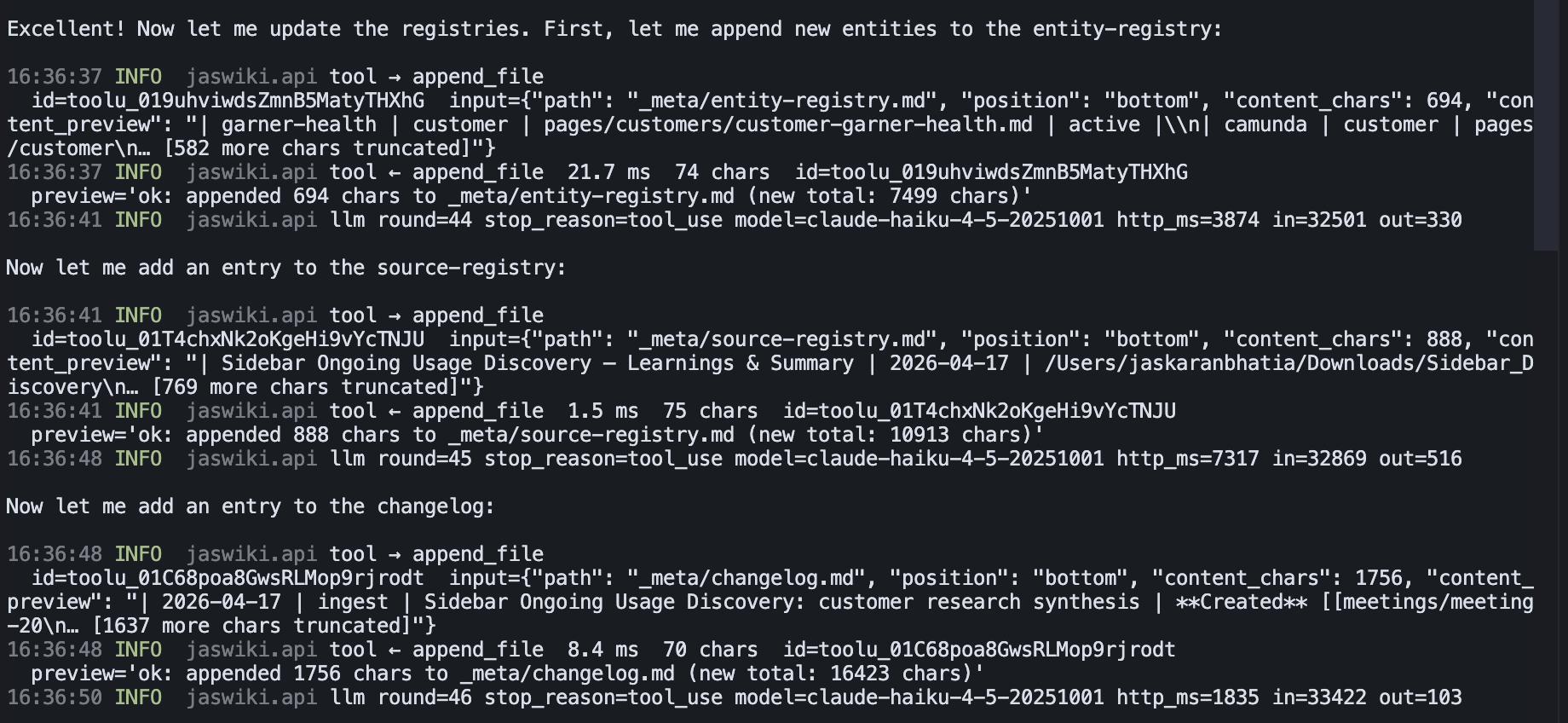
This is a small change architecturally but it has a disproportionate impact on how the system feels to use. Visible reasoning builds trust in a way that a loading spinner never can.
The Real Value: It Sounds Like Me
When I query the system and get an answer, the answer sounds like me.
Not exactly like me, but close enough that I can run with thit. The opinions it surfaces are opinions I have actually expressed. The positions on product strategy are positions I have actually taken in conversations. When it tells me something about how I think about agentic architecture, it is drawing on my actual words from my actual calls, not on some generalised model of what an AI PM thinks.
This is different from asking Claude a general question about product strategy. Claude will give you a smart, generic answer. Jaswiki gives you what I would say, because everything in the graph came from things I said, wrote, or contributed to.
That is the real value prop. Not faster note-taking. Not better search. It is the ability to query your own thinking at scale.
Right now the graph covers (some-what sparsely, I should say) about 2-3 months of professional context. I want to extend it further back, and eventually I want to extend it beyond work entirely, pulling in personal decisions and opinions alongside professional ones. I also want to implement the Reflect mode properly: an agent that traverses the graph looking for patterns and connections I have not explicitly drawn, and writes those inferences back as new knowledge nodes.
That is most likely what the next post about jaswiki will cover.
Some Takeaways
A few notes before I wrap up, and takeaways for you if you want to build your own.
-
I would define the ontology (the document categories) sooner than later, and more carefully. I added Decisions and Opinions after I had already ingested a bunch of documents that should have been categorised that way. Think of what kinds of things you're most likely to need from your knowledge.
-
Start with tests. If you're not going to be reviewing all of the code, and you want to build a system that can scale quickly, categorically ask your Coding agent to write tests. Be explicit about known failure modes (pick some up from my examples)
-
I would have added the verbose console output from the start. I ran the system as a black box for the first few times and it made debugging much harder than it needed to be.
-
Just build what you want. The cost of building things has gone down. You can custom make software if you're half good at engineering.
Where to Go From Here
If you want to build something like this, the barrier is genuinely lower than it looks. You need a Claude API key (or any LLM API), a basic understanding of how tool-calling works, and a few hours to build the initial v0. Cursor or any AI IDE will handle the implementation if your PRD is clear enough.
The stack is: Python, the Anthropic API, local Markdown files, and Git. That is the whole thing.
I will write the next post once I have the Sync and Reflect modes working properly. Sync will cover pulling external data in from Slack, Google Drive, and other places where my professional context lives. Reflect will cover what it looks like when the agent starts generating inferred knowledge from the graph.
If you build something similar or have questions about any of the architecture decisions above, I am easy to find.